
The iPhone app uninstaller · Now on Mac and Windows
Delete iPhone apps. All at once.
Connect your iPhone to your Mac or Windows PC. Select the apps you don't need, and delete them together, in one batch. No more touch, hold, remove, and delete for every app.
Free scan · $9.99 one time to delete · Runs on your Mac (macOS 15 Sequoia or later)Runs on your Windows PC (Windows 10 (1809) or later, or Windows 11)
Demo data
Can you delete many iPhone apps at once?
Yes. Select them. Confirm once. Done.
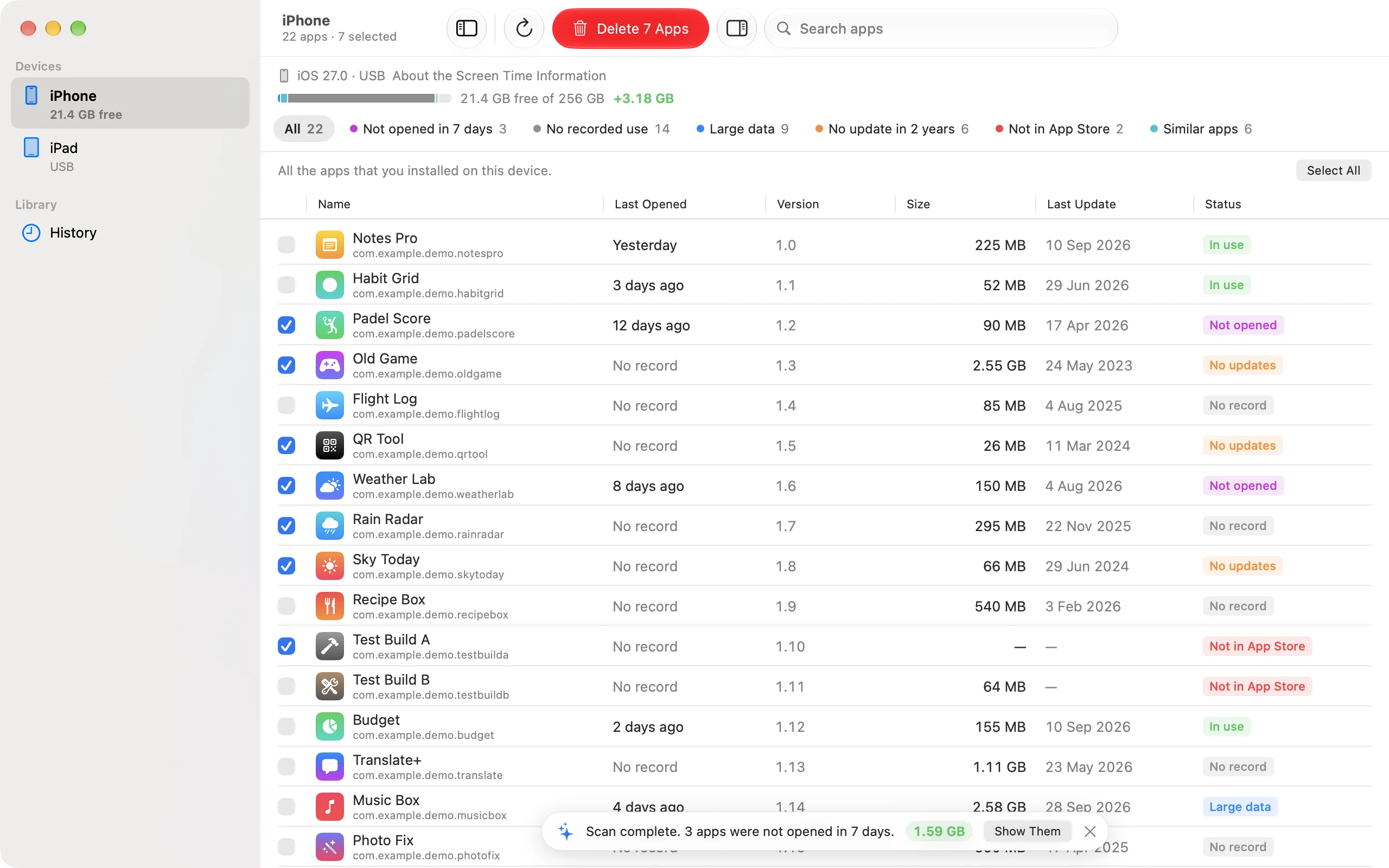
iUninstall is an app for Mac and Windows that removes many iPhone apps in one batch. You see every app on your iPhone in one list, with its size and, on a Mac with Screen Time, when you last opened it. Tick the ones you want gone, and iUninstall deletes them one after the other.
On the iPhone, one app at a time
taps for 50 apps.
Three or four taps for each app: touch and hold, Remove App, Delete App, Delete. Then find the next icon, and do it again. And again.
With iUninstall on your Mac
confirmation for 50 apps.
Select the apps in a list, or click Select All. Check the list one time. iUninstall does the rest, and you can watch each app go.
How it works
Three steps. Then a cleaner iPhone.
Connect your iPhone.
Use a USB cable. iUninstall finds your iPhone and reads all the apps that you installed, with their icons and sizes.
Select the apps.
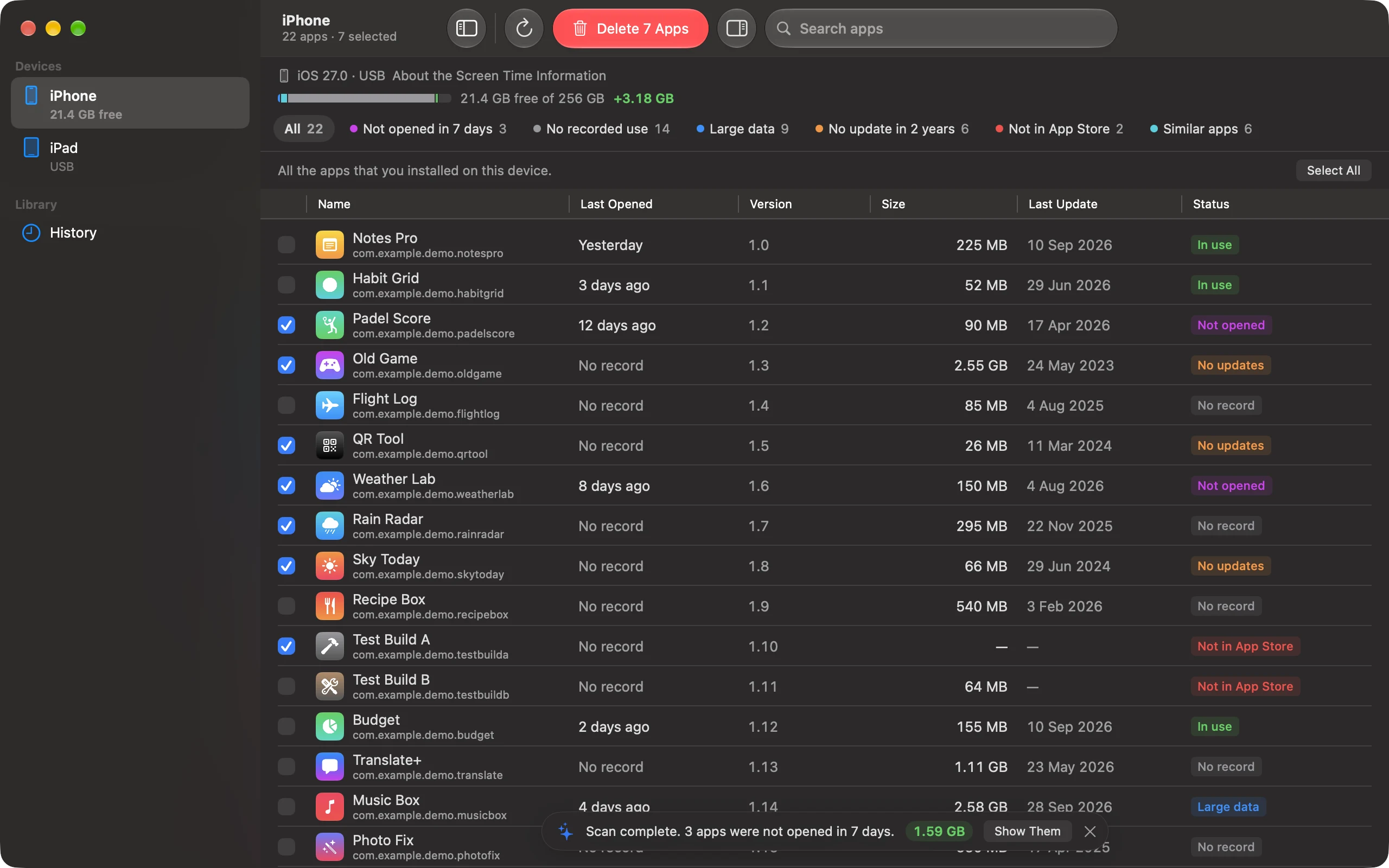
Tick apps one by one, or filter by "Not opened" or "Large data" and select them all. Check the list one time.
Delete them together.
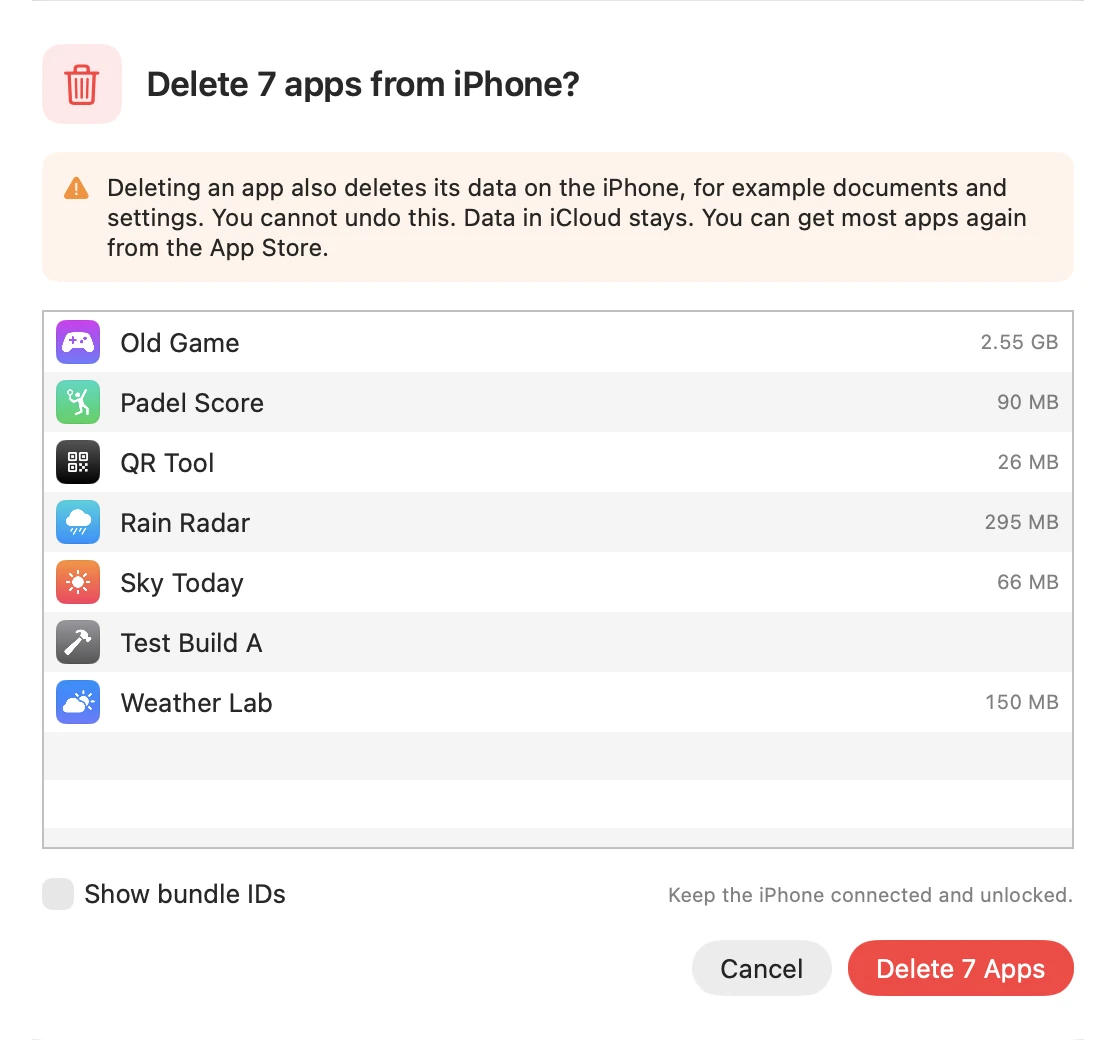
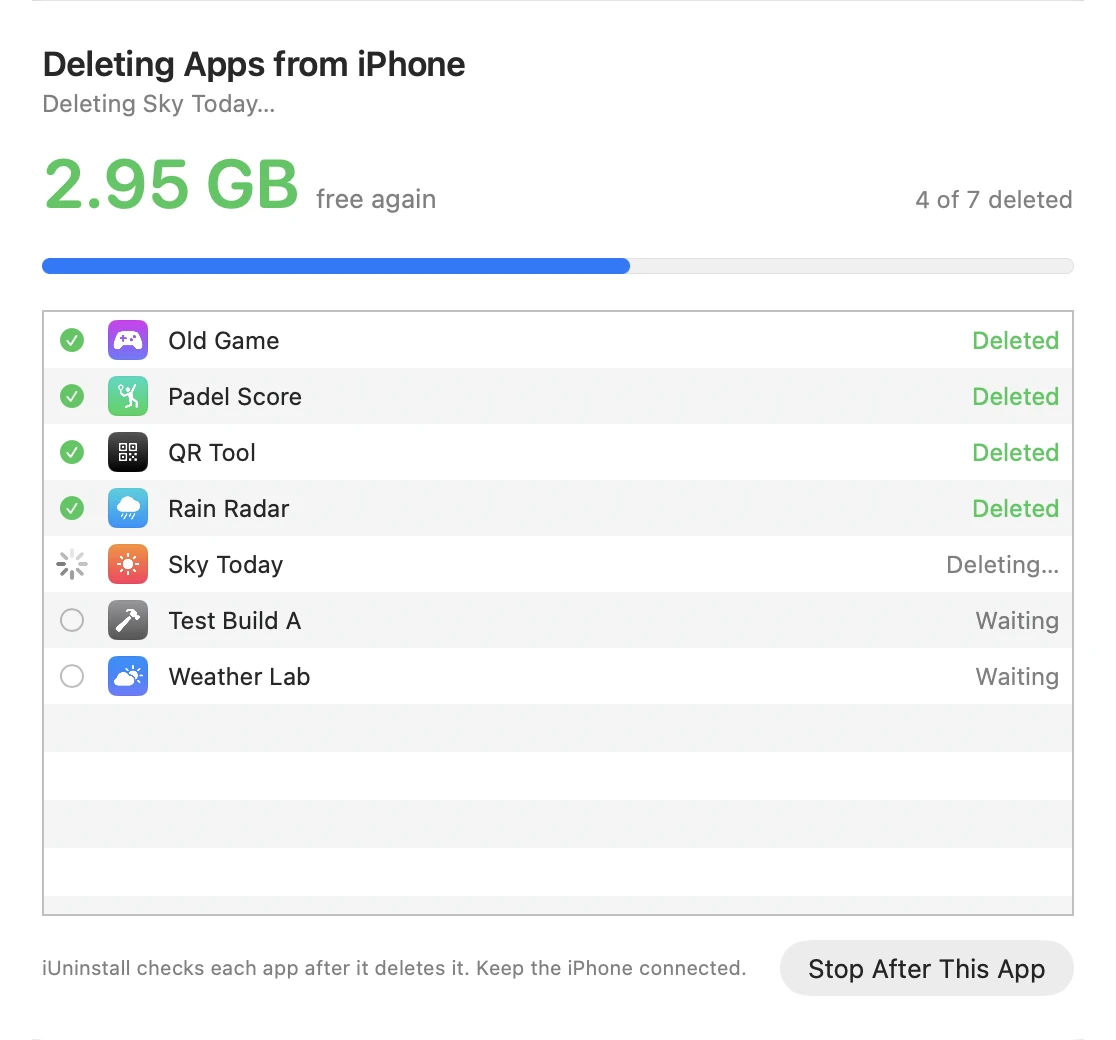
iUninstall deletes the apps one after the other. It checks that each app is gone, and it adds up the size of the deleted apps.
Know before you pay
See the gigabytes. Before you pay.
The free scan shows the size of every app and its data. Select the apps, and iUninstall adds up the space that they use. During the batch, the total counts up as each app goes.
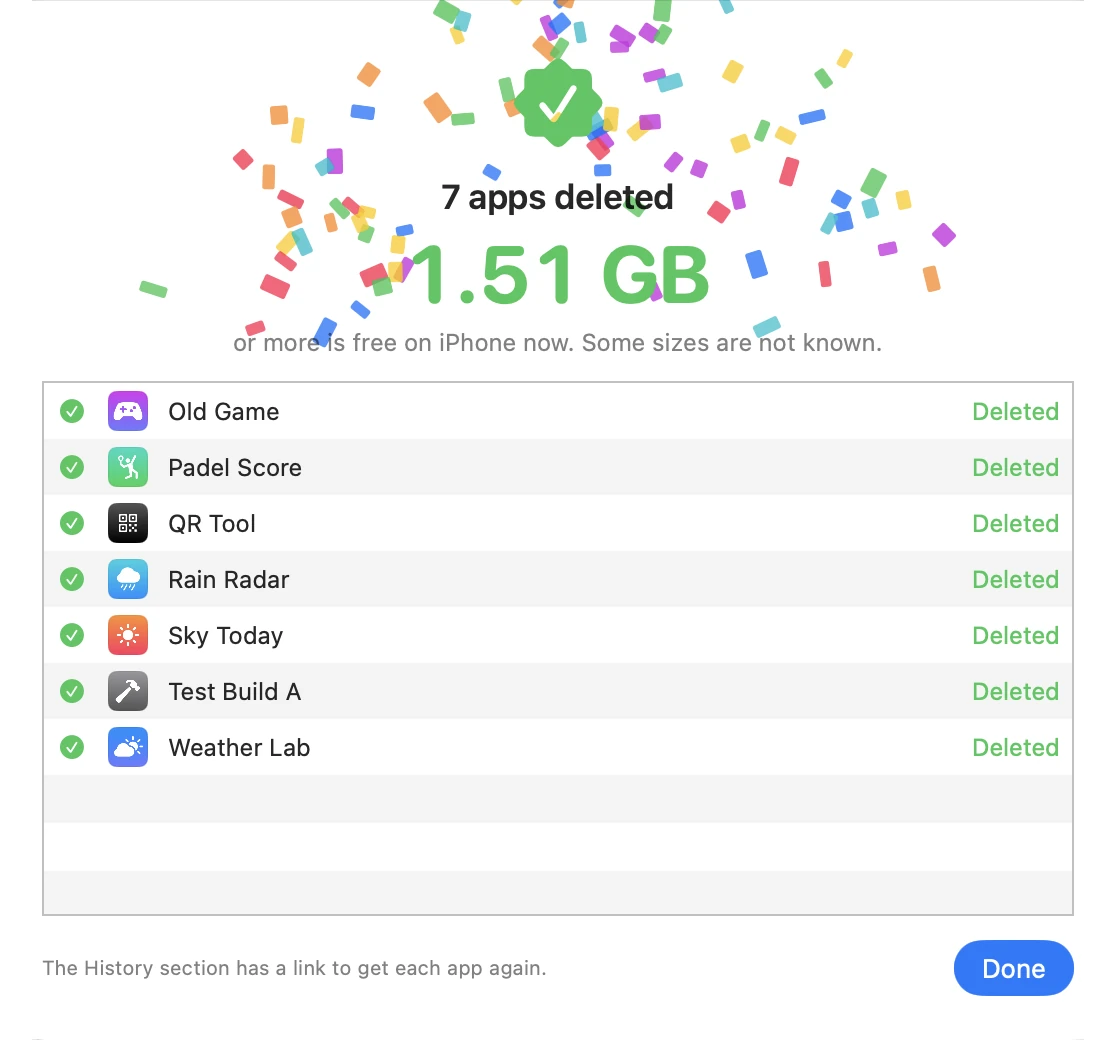
- Each app is checked after it is deleted. The list shows "Deleted" only when the app is really gone.
- A long list runs on its own. You keep working on your computer.
- Changed your mind? Click Stop After This App.
Features
Everything you need to clean up. Nothing you don't.
Batch delete
Select as many apps as you want, or click Select All. One confirmation deletes them all, one after the other.
Find the apps you forgot
Turn on Screen Time sharing, and iUninstall shows when you last opened your apps, from about the last 4 weeks. The apps you forgot get their own list.
See every size
The app size and the data size of each app, and the free space on your iPhone, before you delete.
Checked, not guessed
After each app, iUninstall reads the app list again. "Deleted" means the app is gone.
Protect your favorites
Mark the apps that must stay. iUninstall never selects a protected app.
A record of every deleted app
Every deleted app goes into the History, with its version, its size, and a link to download it again from the App Store.
Native on Mac and Windows
Made for macOS, and for Windows 11 with the Fluent look, in light and dark mode. No Xcode, no jailbreak. Just a cable.
Unused app remover
Not opened in weeks?
Now you know.
Your iPhone can share its Screen Time information with your Mac. iUninstall reads it on your Mac and puts the apps that you have not opened in weeks into one list. Select that list, and they are gone.
Private by design
Your apps are your business.
No account
Download, open, and connect. iUninstall asks for no email and no sign-in.
Stays on your Mac
Your Screen Time information never leaves your Mac. The optional App Store lookup sends only app IDs to Apple.
Nothing without your OK
iUninstall deletes only the apps that you select, and only after you confirm.
Pay once. Keep it.
One-time purchase. No subscription.
- Free: scan your iPhone, see every app with its size and last use.
- Unlock: delete as many apps as you want, as often as you want.
- All updates of version 1 are included.
Try the free scan first. Buy only when you see what you can delete.
Questions? Answers.
Can I delete multiple iPhone apps at once?
Yes. iUninstall is an app for Mac and Windows that deletes many iPhone apps in one batch. Connect your iPhone to your computer with a cable, select the apps that you want to remove, and confirm one time. iUninstall removes the apps one after the other and checks that each app is gone.
What do I need?
A Mac with macOS 15 Sequoia or later, or a Windows PC with Windows 10 (1809) or later, or Windows 11. You also need your iPhone and a USB cable. Your iPhone must trust your computer: when you connect it for the first time, tap Trust on the iPhone. On a Mac, you need nothing else. On Windows, install the Apple Devices app from the Microsoft Store, or iTunes, because it supplies the USB driver for the iPhone. Open Apple Devices one time and click Agree. You never need Xcode or a jailbreak.
Does iUninstall work on Windows?
Yes. iUninstall runs on Windows 10 (1809) or later and on Windows 11, on x64 PCs and on ARM64 PCs such as Snapdragon laptops. It has the same batch deletion as the Mac version, with the native Windows 11 look. Install the Apple Devices app from the Microsoft Store, or iTunes, so that Windows can talk to your iPhone. One license works on Mac and Windows.
Is iUninstall free?
The download and the scan are free. You see all your apps with their sizes, and the apps that you do not open. On Windows, your first 2 deletions are also free. To delete more apps, you buy iUninstall one time for $9.99. There is no subscription.
Does deleting an app also delete its data?
Yes. When iUninstall deletes an app, the app and its documents and settings on the iPhone go too. This is the same as when you delete an app on the iPhone. Data that the app keeps in iCloud stays in iCloud. You can download most apps again from the App Store, and the History in iUninstall has a link for each deleted app.
Can iUninstall delete an app by mistake?
iUninstall never deletes an app that you did not select, and it deletes nothing before you confirm the list. You can mark apps as protected, so they are never selected. During a batch, you can click Stop After This App.
How does iUninstall know which apps I do not use?
Your iPhone can share its Screen Time information with your Mac. iUninstall reads that information on your Mac and shows when you last opened your apps, for about the last 4 weeks. This works only on a Mac, and it is optional. Without it, you still see all your apps with their sizes and can select them yourself.
Does iUninstall upload my data?
No. iUninstall needs no account. Your app list and your Screen Time information stay on your computer. Two things use the network: the optional App Store lookup sends the bundle IDs of your apps to the public App Store of Apple, and the license activation sends your license key to Dodo Payments.
Stop deleting apps
one by one.
Download iUninstall, connect your iPhone, and see how many apps you can let go today.
macOS 15 Sequoia or later, or Windows 10 (1809) or later, or Windows 11 · iPhone with a USB cable